Answer:
Incorporate this line into the code utilizing the format method:
result = "{} miles equals {:.1f} km".format(miles,km)
Explanation:
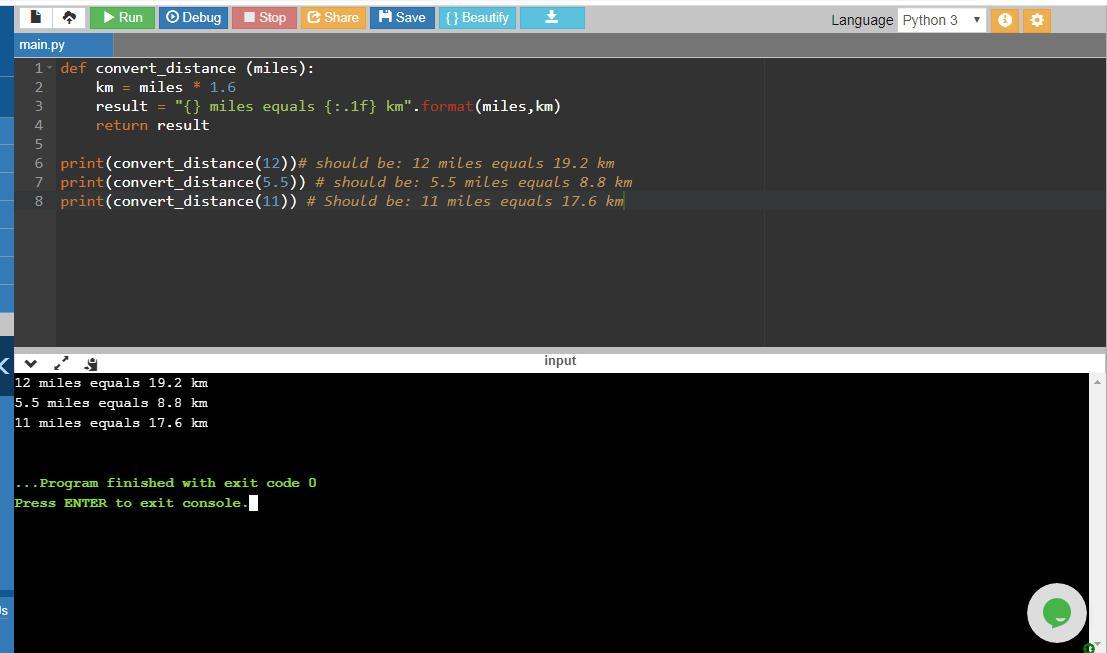
Here’s the full program:
def convert_distance(miles):
km = miles * 1.6
result = "{} miles equals {:.1f} km".format(miles, km)
return result
print(convert_distance(12))# expected output: 12 miles equals 19.2 km
print(convert_distance(5.5)) # expected output: 5.5 miles equals 8.8 km
print(convert_distance(11)) # expected output: 11 miles equals 17.6 km
The format() method allows the formatting of the specified parameter values and replaces the placeholders in curly braces. The parameters used in format()here are miles and km. The first placeholder corresponds to the formatted value of miles variable while the second is for the value of km. Note that the second placeholder for km uses {:.1f} indicating that the km value is rounded to one decimal place. For instance, if the value is 19.23245, it will show as: 19.2
The program includes a method convert_distance that accepts miles as an input and calculates kilometers using the formula:
km = miles * 1.6
It subsequently displays the results in the defined format utilizing format() method. Now let's consider an example:
print(convert_distance(5.5))
This command invokes the method with a 5.5 miles input leading to
miles = 5.5
Hence, the function converts this to kilometers as:
km = miles * 1.6
km = 5.5 * 1.6
km = 8.8
With the statement: result = "{} miles equals {:.1f} km".format(miles,km) it becomes:
{} the first placeholder signifies the value of miles which is 5.5
{} the second placeholder represents the value of km rounded to one decimal, which is 8.8
Thus, it will show as:
5.5 miles equals 8.8 km
Therefore, the return result will output the conversion result.
So the output becomes:
5.5 miles equals 8.8 km
The program and its results have been provided.