answer.
Ask question
Login Signup
Ask question
All categories
  • English
  • Mathematics
  • Social Studies
  • Business
  • History
  • Health
  • Geography
  • Biology
  • Physics
  • Chemistry
  • Computers and Technology
  • Arts
  • World Languages
  • Spanish
  • French
  • German
  • Advanced Placement (AP)
  • SAT
  • Medicine
  • Law
  • Engineering
olga55
20 days ago
15

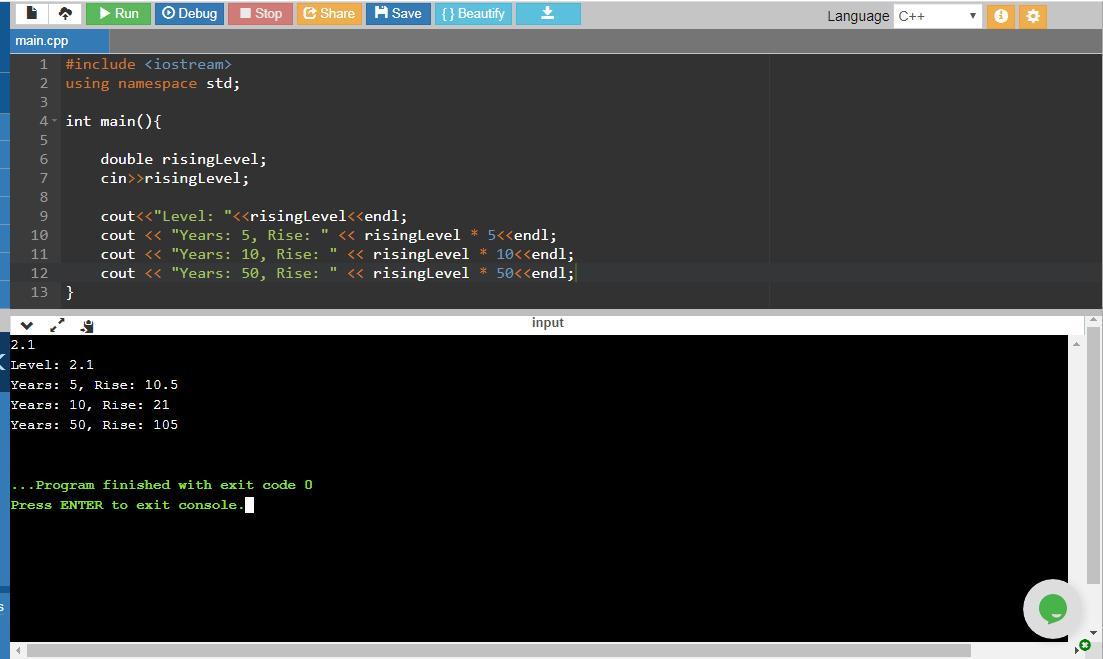
This program will calculate the rise in ocean levels over 5, 10, and 50 years, Part of the program has been written for you. The

part that has been written will read in a rise in ocean levels (per year) in millimeters. This value is read into a variable of type double named risingLevel. You will be completing the program as follows Output the value in risingLevel. This should be the first line of output. The output should be as follows (assume risingLevel has a value of 2.1) Level: 2.1 The number of millimeters higher than the current level that the ocean's level will be in 5 years (assuming the ocean is rising at the rate of risingLevel per year). This is your second line of output. The output will be as follows Years: 5, Rise: 10.5 The number of millimeters higher than the current level that the ocean's level will be in 10 years (assuming the ocean is rising at the rate of risingLevel per year). This is your third line of output. The output will be as follows (for a risingLevel" of 2.1 Years: 10, Rise: 21 The number of millimeters higher than the current level that the ocean's level will be in 50 years (assuming the ocean is rising at the rate of risingLevel per year). This is your final line of output.The output will be as follows (for a risingLevel" of 2.1) Years: 50, Rise: 105 For each of the above you need to output the number of years and the total rise in ocean levels for those years. This is all based on the value in risingLevel For example: ArisingLevel of 2.1 for 5 years would have the following output: Level: 2.1 Years: 5, Rise: 10.5 Years: Years: 50, Rise: 105 10, Rise: 21 Your output must have the same syntax and spacing as above

Computers and Technology
1 answer:
maria [1K]20 days ago
4 0

Answer:

Here is the C++ code:

#include <iostream> //for utilizing input and output functions

using namespace std; //for defining objects cin cout

int main(){ //beginning of the main function


   double risingLevel; //declares a variable of type double to store the rising level

   cin>>risingLevel; //captures the risingLevel input from the user


   cout<<"Level: "<<risingLevel<<endl; //outputs the rising level

   cout << "Years: 5, Rise: " << risingLevel * 5<<endl; //outputs the increase in ocean level over 5 years

   cout << "Years: 10, Rise: " << risingLevel * 10<<endl; //outputs the increase in ocean level over 10 years

   cout << "Years: 50, Rise: " << risingLevel * 50<<endl; //outputs the increase in ocean level over 50 years

}

Explanation:

The functioning of the program is as follows:

Supposing the user inputs a rising level of 2.1, then,

risingLevel = 2.1

At that point, the first print statement (cout):

cout<<"Level: "<<risingLevel<<endl; outputs the value of risingLevel to the display. Therefore, this line shows:

Level: 2.1

Next, the program proceeds to the following statement:

   cout << "Years: 5, Rise: " << risingLevel * 5<<endl;

which calculates the increase in ocean levels for a duration of 5 years using the equation:

risingLevel * 5 = 2.1 * 5 = 10.5

It subsequently shows the calculated result on the display. So, this line shows:

Years: 5, Rise: 10.5 Then, the control shifts to the next statement:

   cout << "Years: 10, Rise: " << risingLevel * 10<<endl;

that computes the rise in ocean levels over a span of 10 years using the equation:

risingLevel * 10 = 2.1 * 10 = 21

It then showcases the calculated figure on the output screen. Thus, the output is:

Years: 10, Rise: 21

Next, the program control progresses to this statement:

   cout << "Years: 50, Rise: " << risingLevel * 50<<endl;

which determines the rise in ocean levels for a duration of 50 years using the equation:

risingLevel * 50 = 2.1 * 50 = 105

This then displays the computed result on the output screen, leading to the output:

Years: 50, Rise: 105 Consequently, the complete output from the program will be:

Level: 2.1 Years: 5, Rise: 10.5

Years: 10, Rise: 21

Years: 50, Rise: 105
You might be interested in
CHALLENGE ACTIVITY 2.15.1: Reading and outputting strings. Write a program that reads a person's first and last names, separated
Harlamova29_29 [1022]

Response:

#include <iostream>

using namespace std;

int main()

{

   string Fname, Lname;

   cout << "Please enter your first name " <<"Please enter your last name" <<endl;

   cin>>Fname>>Lname;

   cout<<Lname<<", "<<Fname<<endl;

   return 0;

}

Clarification:

This code is coded in the C++ programming language. To begin with, two string variables are declared, namely Fname and Lname for the first and last names, respectively. The C++ cout function is utilized to ask users for their inputs, while the cin function takes in user inputs and stores them in the corresponding variables. The cout operator (<<) arranges the output in accordance with the specification given in the question

8 0
1 month ago
24. Which of the following statements about Emergency Support Functions (ESFs) is correct?
8_murik_8 [964]

(ESFs) is accurate: ESFs are not solely a federal coordinating mechanism.

5 0
2 months ago
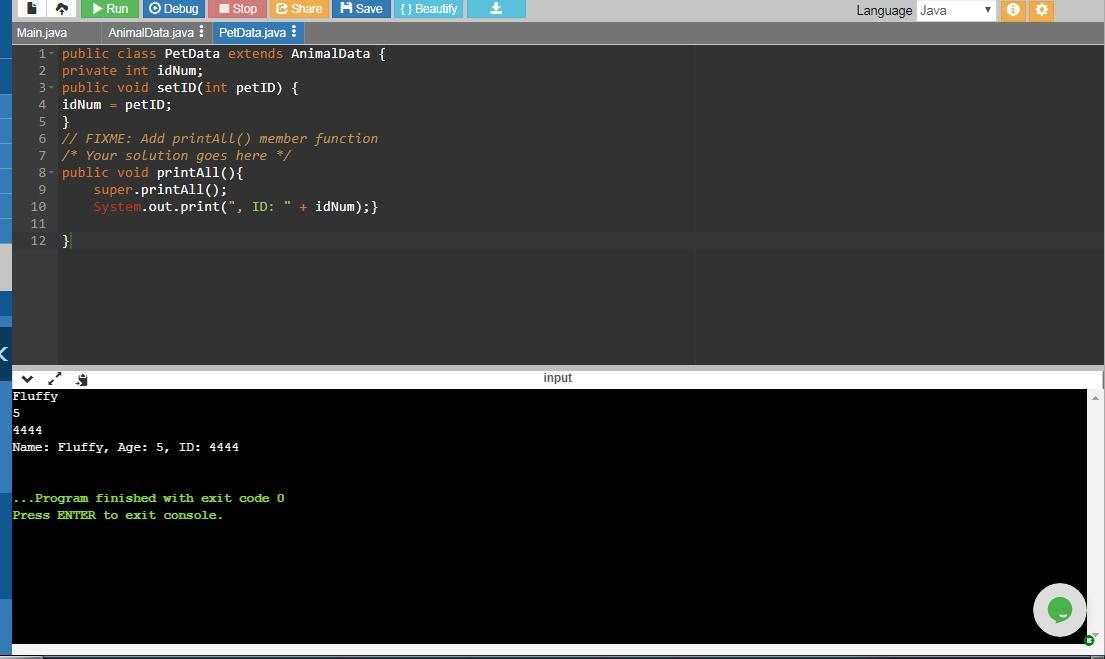
Define a method printAll() for class PetData that prints output as follows with inputs "Fluffy", 5, and 4444. Hint: Make use of
ivann1987 [1066]

Answer:

public void printAll(){ // member function petAll()

   super.printAll(); //  invokes printAll() method from the superclass (base class) AnimalData using the super keyword

   System.out.print(", ID: " + idNum);} // displays the ID saved in the idNum field of the PetData class

Explanation:

This is the full PetData class:

public class PetData extends AnimalData { //

private int idNum;

public void setID(int petID) {

idNum = petID; }

// FIXME: Implement printAll() member method

/* Your solution goes here */

public void printAll(){

   super.printAll();

   System.out.print(", ID: " + idNum);}  }

The PetData class is a subclass that inherits from the base class AnimalData.

This class contains a private field, idNum, which is designated for storing the ID value.

It includes a method setID which takes petID as a parameter that corresponds to idNum. Essentially, this acts as a mutator to set the user ID.

Additionally, there is a printAll() method that makes use of the super keyword to call the printAll() method from the base class, AnimalData.

Using super refers to objects of the base class.

Here, the super keyword is utilized with the method name from the subclass PetData to avoid confusion, as both AnimalData and PetData have a method named printAll().

During the main() method, users will enter values for userName, UserAge, and UserID. For example, if the user inputs Fluffy as the name, 5 as the age, and 4444 as the userID. Then, calling userPet.printAll(); will execute the printAll() method from the PetData class since userPet is an instance of PetData.

When this method executes, it will call the printAll() of AnimalData class which outputs the Name and Age, while printAll() of PetData prints the ID. Consequently, the resulting output will be:

Name: Fluffy, Age: 5, ID: 4444

8 0
2 months ago
Look at the top 3 banking activities done via mobile banking vs. online banking. What characteristics do you notice for both?
Amiraneli [1052]

Answer:  The main distinction lies in their functionalities. Internet Banking enables transactions online via a computer or laptop with internet access, while Mobile Banking can function both online and offline. Numerous banks today offer mobile applications for facilitating mobile banking.

Disadvantages of Mobile Banking

Mobile banking has limitations for those without smartphones, as certain transactions, like funds transfers, may only be accessible on advanced devices. Regular use of Mobile Banking could incur additional charges imposed by the bank for the service.

Explanation: If this information was beneficial, please consider designating me as.

4 0
2 months ago
The following is a string of ASCII characters whose bit patterns have been converted into hexadecimal for compactness: 73 F4 E5
Rzqust [1037]

Answer:

a) Transforming each character into its binary equivalent:

73:

The digits are 7 and 3

7 in binary is: 111

3 in binary is: 11

Thus

73: 0_111_0011

Likewise

F4:

F stands for 15 and its binary is: 1111

4 in binary: 100

Consequently

F4:  1_111_0100

E5:

E corresponds to 14 and its binary form is: 1110

5 in binary: 101

Therefore

E5:  1_110_0101

76:

7 in binary: 111

6 in binary: 110

Hence

76:  0_111_0110

E5:

E has a binary representation of: 1110

5 in binary: 101

Consequently

E5:  1_110_0101

4A:

4 in binary: 100

A represents 10

A in binary form: 1010

Therefore

4A:  0_100_1010

EF:

E in binary is: 1110

F in binary is: 1111

Thus

EF: 1_110_1111

62:

6 in binary form: 110

2 in binary form: 10

Therefore

62:  0_110_0010

73:

The digits are 7 and 3

7 in binary is: 111

3 in binary is: 11

Thus

73: 0_111_0011

for 0_1110011: the decimal equivalent is: 115 which translates to s

for 1_1110100:  the decimal equivalent is: 116 which translates to t

for 1_1100101:  the decimal equivalent is: 101 which translates to e

for 0_1110110: the decimal equivalent is:  118 which translates to v

for 1_1100101:  the decimal equivalent is: 101 which translates to e

for 0_1001010: the decimal equivalent is:  74 which translates to j

for 1_1101111: the decimal equivalent is: 111 which translates to o

for 0_1100010:  the decimal equivalent is: 98 which translates to b

for 0_1110011: the decimal equivalent is:  115 which translates to s

Thus the decoded sequence is:  stevejobs

b) The parity being utilized is odd.

for 0_1110011:  There are 5 instances of 1s and the parity is 0 indicating it is odd.

for 1_1110100: There are 4 instances of 1s and the parity is 1 indicating it is odd.

Thus, we count the number of 1s and then verify if the parity is odd or even.

Likewise

for 1_1100101:  the parity is odd

for 0_1110110: the parity is odd

for 1_1100101:  the parity is odd

for 0_1001010: the parity is odd

for 1_1101111: the parity is odd

for 0_1100010: the parity is odd

for 0_1110011: the parity is odd

Therefore, the parity being used is odd.

5 0
1 month ago
Other questions:
  • Which of these is an example of the integrity principle that can ensure your data is accurate and untampered with?
    10·2 answers
  • In Python, what kind of error is returned by the following code? (e.g. NameError, ValueError, IOError, etc.) def my_func(n1, n2)
    8·1 answer
  • Write measurable performance objectives.Suppose that a trainer has identified as a generalgoal for a training module,"Able to fo
    13·1 answer
  • What is the other name designated to a game master of multiplayer online games (MMOs)?
    11·2 answers
  • Discussion Question 10: A bank in California has 13 branches spread throughout northern California , each with its own minicompu
    13·1 answer
  • Henry, a graphic artist, wants to create posters. Which software should Henry use for this purpose?
    13·1 answer
  • Define a new object in variable sculptor that has properties "name" storing "Michelangelo"; "artworks" storing "David", "Moses"
    12·1 answer
  • The engineering firm you work for is submitting a proposal to create an amphitheater at a state park. Proposals must be submitte
    15·1 answer
  • The geographic coordinate system is used to represent any location on Earth as a combination of latitude and longitude values. T
    5·1 answer
  • A colleague asks you to research a CPU for a new server that will run Windows Server 2019. He explains the server roles that he
    7·1 answer
Add answer
Login
Not registered? Fast signup
Signup
Login Signup
Ask question!